
10 Tips to Speed Up Odoo Websites
Digital Transformation
Feb 17, 2026
Step-by-step strategies to cut Odoo website load times: caching, asset minification, image compression, CDN, DB tuning, reverse proxy, workers, and monitoring.

Your website's speed directly impacts user experience, conversions, and revenue. A slow-loading Odoo site can lead to higher bounce rates, reduced SEO rankings, and lost sales. But the good news? You can fix it. Here are 10 proven strategies to optimize your Odoo website's performance:
Enable Caching: Use tools like Redis, Memcached, or Varnish to reduce load times by delivering pre-rendered pages and assets.
Minimize CSS & JavaScript: Compress and combine files to reduce page weight and HTTP requests.
Compress Images: Use formats like WebP and tools like TinyPNG to shrink file sizes without losing quality.
Use a CDN: Speed up content delivery by serving static files from servers closer to your users.
Optimize Database Queries: Add indexes to frequently queried fields and adjust PostgreSQL settings for better performance.
Set Up a Reverse Proxy: Tools like Nginx or HAProxy handle SSL, static files, and compression, reducing server load.
Enable Multi-Worker Mode: Leverage all CPU cores to handle more concurrent users and tasks.
Upgrade Server Hardware: Invest in SSDs, more RAM, and better CPUs for faster processing and database access.
Simplify Views & Disable Unused Modules: Reduce complexity by removing unnecessary modules and optimizing QWeb templates.
Monitor Performance: Use Odoo's profiler and tools like Google PageSpeed Insights to identify and fix bottlenecks.
Why it matters: A 1-second delay in load time can reduce conversions by 7%, and 53% of mobile users abandon sites that take over 3 seconds to load. By implementing these steps, you can significantly improve load times, boost user satisfaction, and drive better results for your business.
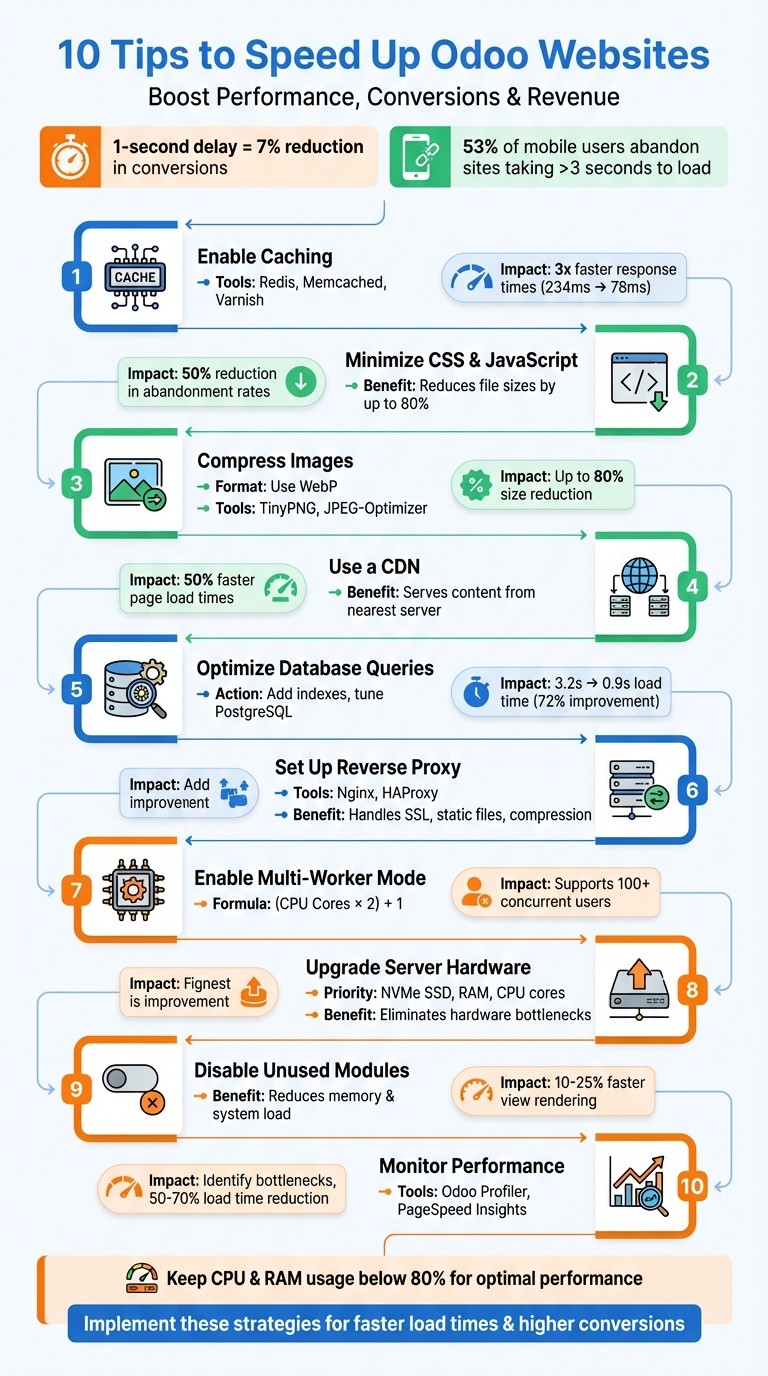
10 Proven Strategies to Speed Up Odoo Websites - Performance Optimization Checklist
Odoo Experience 2018 - How to Optimize the Speed of Odoo eCommerce/Website up to Maximum Level?
1. Enable Odoo Website Caching
If you’re looking to significantly improve your Odoo website’s performance, caching is a game-changer. By delivering pre-rendered pages directly from memory, caching slashes load times, making it essential for high-traffic websites where speed is critical.
Impact on Load Time Reduction
The performance boost you can achieve with caching is impressive. For instance, Different caching layers tackle various bottlenecks. Redis session caching, for example, shifts session storage from disk to RAM, eliminating delays caused by disk access during session validation. Meanwhile, tools like Varnish or NGINX handle static assets (e.g., JavaScript, CSS, and images), bypassing the Odoo server entirely. Additionally, configuring PostgreSQL’s shared_buffers to use 25–40% of your total RAM ensures frequently accessed data is stored in memory, further speeding up operations.
Ease of Implementation
Setting up caching in Odoo can range from simple to more advanced configurations, depending on your needs. Out of the box, Odoo already includes asset caching that combines and minifies CSS and JavaScript files, reducing HTTP requests. However, keep in mind that this optimization is disabled when debug mode is active, so make sure to turn off debug mode in production.
For more advanced caching, tools like Redis and Memcached come into play. Redis session caching requires installing Redis and updating your odoo.conf file with the correct host and port. For QWeb template caching, you might need to tweak the render method in ir.qweb to check for cached content before rendering templates. Similarly, setting up Varnish involves additional configuration to strip cookies from static asset requests, ensuring efficient delivery.
Cost-Effectiveness
One of the best things about caching is its affordability. Tools like Redis, Memcached, Varnish, and NGINX are free to use and only require minimal additional RAM. This means you can achieve significant performance gains without investing in costly hardware upgrades.
By offloading repetitive tasks, caching allows a standard 8-core server to handle over 400 concurrent users. Without caching, you’d likely need much more powerful - and expensive - hardware to achieve the same results.
Compatibility with Odoo
Odoo integrates seamlessly with widely-used caching solutions. For example, NGINX is often employed as a reverse proxy to manage static asset caching and compression. Redis session storage is supported natively in Odoo Enterprise and through community modules in the Community Edition. Varnish is another excellent option, offering granular cache control for high-traffic websites processing over 1,000 requests per minute.
Here’s a quick comparison of caching options:
Caching Method | Impact | Complexity | Best For |
|---|---|---|---|
Redis Session Cache | High | Medium | Multi-server setups, 200+ users |
Varnish HTTP Cache | Medium-High | Advanced | High-traffic sites (1,000+ req/min) |
NGINX Caching | Medium | Easy | Standard production deployments |
Memcached (QWeb) | High | Medium | Reducing HTML generation time |
For businesses aiming to maximize Odoo’s potential, consulting with experts like W4 Martech Technology For Business can provide tailored optimization strategies. Effective caching not only boosts performance but also sets the stage for further enhancements down the line.
2. Minimize CSS and JavaScript
How It Impacts Load Time
After applying caching strategies, the next step to boost your site's speed is minimizing CSS and JavaScript. This process reduces the size of these assets, which directly cuts down load times. Odoo simplifies this with built-in tools for minification, concatenation, and compression. Here's what each does:
Minification removes unnecessary characters (like spaces and comments) from your code.
Concatenation combines multiple files into one bundle, which is crucial since browsers can only handle a limited number of simultaneous requests per domain.
Compression shrinks file sizes before they're sent to users.
For example, cutting your page load time from 4 seconds to 2 seconds can slash visitor abandonment rates by 50%. For e-commerce businesses, this means more customers staying engaged, leading to higher conversions and revenue.
Simple to Implement
Odoo takes care of CSS and JavaScript optimization automatically, handling preprocessing, concatenation, minification, and compression. However, there's one key step: disable debug mode in production. Debug mode loads uncompressed files, bypassing these optimizations.
To take it a step further, enable Gzip compression on your web server (like Nginx). This can reduce file sizes by up to 80%, making your site even faster.
Budget-Friendly Optimization
Minimizing CSS and JavaScript is not only effective but also cost-efficient. Odoo's asset management tools are built-in, and additional features like Gzip compression and Nginx are free to use. The payoff? Faster load times can improve bounce rates by as much as 56%. Considering that 53% of mobile users leave a site if it takes longer than three seconds to load, these optimizations are essential for protecting your revenue and keeping customers engaged.
How It Works with Odoo
Odoo's optimization system is designed to work effortlessly with all official themes and modules. It creates separate bundles for website pages, shared code, and backend operations, ensuring users only download what they need.
For older browsers, like Internet Explorer 8, Odoo automatically handles limitations by splitting CSS files if they exceed the 4,095-selector limit. Plus, it uses dynamic URLs with version hashes for assets, allowing long-term caching while ensuring users always get the latest updates when content changes.
If you're looking to push these optimizations further - say, by implementing advanced techniques like Varnish acceleration for high-traffic sites - W4 Martech Technology For Business offers specialized consultancy services. These services are tailored to maximize Odoo's capabilities, ensuring your site performs at its best. Together with Odoo's asset management tools, these enhancements can significantly boost your site's speed and user experience.
3. Compress Images
Once you've fine-tuned assets like CSS and JavaScript, the next step to boosting site speed is optimizing your images. Images often take up a significant chunk of a website's bandwidth, especially when you're dealing with high-quality product photos or detailed graphics. These large file sizes can slow down loading times, and here's the kicker: almost 40% of users will leave a site if it takes longer than 3 seconds to load. Worse, every extra second of delay could cost you around 10% of your total users.
Switching to formats like WebP can make a big difference. WebP files are much smaller compared to traditional formats like JPEG or PNG, yet they maintain excellent image quality. Another trick? Resize your images to the exact dimensions needed before uploading them. This avoids unnecessary scaling by Odoo, saving resources and cutting down on data usage. Plus, modern compression tools can shrink image sizes by up to 80% - and here's the best part - without any noticeable loss in quality. Like caching and minimizing assets, compressing images is a must for keeping your Odoo website running smoothly.
Ease of Implementation
If you're using Odoo 17 or a later version, you're in luck. These versions automatically compress images when you upload them. You can enable this feature under Website > Settings > General Settings. Want to go the extra mile? Free tools like TinyPNG, JPEG-Optimizer, or ShortPixel can compress your images even before you upload them. Additionally, design tools like Canva or GIMP make it easy to resize images to match your site's exact needs. These simple adjustments not only speed up load times but also help you save on costs in the long run.
Cost-Effectiveness
Compressing images is one of those rare strategies that’s both simple and budget-friendly. Many tools, like TinyPNG, offer free options - for instance, you can compress up to 20 images at a time (with a 5MB size limit per image). The payoff? Faster loading times can reduce bounce rates by up to 56%, and with lower bandwidth usage, you’ll also cut down on infrastructure expenses. Considering that 53% of mobile users are likely to leave a site if it takes more than 3 seconds to load, optimizing your images is a no-brainer. For businesses managing high-traffic Odoo websites, W4 Martech Technology For Business offers specialized consulting services to help you fine-tune performance and safeguard your revenue.
4. Use a CDN
After compressing images, the next step is to implement a Content Delivery Network (CDN) to speed up the delivery of static assets. A CDN works by distributing your website's static files - such as images, CSS, and JavaScript - across a network of servers located worldwide. When someone visits your Odoo site, the CDN automatically serves content from the server closest to their location. This reduces latency and significantly improves load times. It complements earlier optimizations by further minimizing delays and easing the load on your primary server.
Impact on Load Time Reduction
Using a CDN can make a noticeable difference in page speed. Web browsers typically limit the number of simultaneous requests to a single domain, but a CDN allows static resources to load in parallel. This can cut page load times by as much as 50%. Additionally, your Odoo server doesn’t have to handle every request for static files, freeing up bandwidth and processing power for more critical tasks.
Ease of Implementation
Odoo makes it simple to integrate a CDN directly through its Website app settings. To get started, enable Developer Mode to access the CDN configuration fields. Set up your CDN as a "Pull Zone", using your full Odoo database URL (e.g., https://yourdatabase.odoo.com) as the origin. Then, enter the CDN Base URL in Odoo in the format //yourzone.kxcdn.com/ - note the two slashes before and one after. Make sure to enable CORS (Cross-Origin Resource Sharing) in your CDN dashboard. Without this, browsers may block assets like Font Awesome icons and CSS-linked files. To confirm everything is working, use your browser's developer tools to verify that assets are being delivered from the CDN.
Cost-Effectiveness
For Odoo users, a CDN is a budget-friendly way to enhance performance. Major providers like AWS, Google Cloud Platform, and Microsoft Azure offer free tiers for up to a year, allowing you to test the benefits without upfront costs. Even after the free period, CDN expenses are typically low, especially when compared to the potential revenue loss from slow load times. For businesses using shared hosting with Odoo - often chosen for its affordability - a CDN can help overcome the inherent performance limitations of such environments. If you need help setting up your CDN, W4 Martech Technology For Business offers expert Odoo consultancy to ensure your integration is seamless and effective.
The next tip will cover additional server and query optimizations to keep improving performance.
5. Optimize Database Queries and Indexing
Fine-tuning your PostgreSQL database is a game-changer when it comes to eliminating query bottlenecks. Since Odoo depends heavily on PostgreSQL, poorly optimized queries can bog down every page load. To speed things up, index fields that are frequently queried and tweak key PostgreSQL settings. Indexes help the database locate data quickly without scanning entire tables, while memory adjustments ensure frequently used data stays in RAM for faster access.
Impact on Load Time Reduction
Optimizing your database can lead to noticeable speed improvements. For instance, profiling in October 2025 uncovered N+1 queries. After implementing read_group batching and adding two indexes on partner fields, load times dropped dramatically - from 3.2 seconds to just 0.9 seconds. This also resulted in an 18% reduction in abandoned quote edits. It's worth noting that PostgreSQL's default settings are tailored for small 1GB servers. Adjusting just four memory parameters can unlock major performance gains. For example, setting shared_buffers to 25–40% of your total RAM keeps frequently accessed data, like product and partner information, in memory. Meanwhile, configuring effective_cache_size to 50–75% of RAM helps the query planner favor indexes over slower sequential scans.
Ease of Implementation
Adding an index in Odoo is straightforward. A simple one-line Python model change using index=True on commonly filtered fields does the trick. For instance, if you often search by date or customer name, indexing those fields can save the database from scanning entire tables. To pinpoint which queries need optimization, enable Odoo's built-in profiler in Developer Mode (Bug Icon > Start Profiling). The profiler generates Flamegraphs that highlight exactly where slowdowns occur.
Tuning PostgreSQL settings requires editing configuration files and adjusting parameters like work_mem (set between 16MB and 64MB to avoid slow disk-based sorting) and random_page_cost (set to 1.1 for SSDs to prioritize index usage). While adding indexes is relatively beginner-friendly, memory tuning might require deeper technical expertise. For those who need assistance, W4 Martech Technology For Business offers professional Odoo consultancy to ensure optimal database configuration.
Cost-Effectiveness
Database optimization is one of the most budget-friendly ways to boost performance. Instead of upgrading servers or purchasing additional resources, you can achieve better results by simply fine-tuning your current setup. The only downside is that indexes take up some extra disk space, but this is a small price to pay for the speed improvements. Regular maintenance is also crucial. Scheduling a weekly cron job to run VACUUM and REINDEX during off-peak hours can reclaim disk space from "dead tuples" (deleted data flagged by PostgreSQL but not returned to the OS) and refresh indexes for faster queries.
Up next, we’ll explore how reverse proxy configuration can further enhance server performance.
Transform Your Business with W4 Martech
Leverage advanced digital marketing and IT solutions to expand your reach into the Chinese Market, streamline operations, and enhance customer interactions. Explore tailored services like Odoo consultancy, DevOps, and ChatGPT integration to drive growth and efficiency.
6. Set Up Reverse Proxy with Nginx or HAProxy
Building on earlier steps like caching and asset optimization, introducing a reverse proxy - such as Nginx or HAProxy - can significantly boost your Odoo website's performance. These tools take over demanding tasks like SSL termination, serving static files, and enabling Gzip compression, relieving Odoo's built-in Python server from handling these resource-heavy processes. Nginx is especially popular for its ability to efficiently serve static content and manage high levels of traffic.
Impact on Load Time Reduction
A reverse proxy brings several performance perks. It handles SSL encryption and decryption, supports HTTP Keep-alive connections to streamline multiple requests over a single TCP connection, and caches static assets to cut down on latency and server load. Gzip compression, for example, can shrink file sizes by up to 80%, which is crucial when you consider that 53% of mobile users leave websites that take longer than 3 seconds to load. Reducing load times from 4 seconds to 2 seconds could cut abandonment rates by as much as 50%.
Ease of Implementation
Setting up Nginx is relatively straightforward if you have some technical know-how. The process involves installing Nginx, configuring upstream blocks, enabling Gzip and proxy headers, and binding Odoo to 127.0.0.1 for added security. Binding Odoo to localhost ensures that port 8069 is not directly accessible from outside your server.
Cost-Effectiveness
Both Nginx and HAProxy are open-source and completely free, making them a budget-friendly option. By offloading tasks like static file serving and compression, these tools reduce the workload on Odoo workers. This is especially important since Odoo workers typically consume between 300–400 MB of RAM each, with usage sometimes exceeding 1 GB under heavy traffic. With a reverse proxy, you may even be able to reduce the number of workers without sacrificing performance. For expert guidance, W4 Martech Technology For Business offers consultancy services to help you fine-tune your reverse proxy setup for optimal speed and security.
Compatibility with Odoo
Nginx integrates smoothly with Odoo's architecture, managing both standard HTTP(S) requests and WebSocket longpolling traffic, which supports features like live chat and notifications. If you're running Odoo in a production environment with multiple workers, a reverse proxy becomes essential for routing traffic between the main application and longpolling services. Plus, its modular design makes it easy to scale your setup with load balancing as your website traffic grows.
7. Configure Multi-Worker Mode
Odoo operates in "Threaded Mode" (workers = 0) by default, which means it uses only one CPU core for processing tasks. While this setup might work for small-scale operations, it creates a bottleneck when multiple users send requests at the same time. These requests get queued up, leading to delays and even timeouts. Switching to multi-worker mode unlocks the ability to use all available CPU cores, allowing Odoo to handle multiple requests simultaneously.
Impact on Load Time Reduction
Enabling multi-worker mode can significantly enhance system performance. A single worker can process about 6 heavy read transactions per second or support around 6 concurrent users. Without multiple workers, tasks like loading product pages or generating reports can clog the system, causing noticeable delays. For context, one worker can typically handle around 5,000 website visitors per day. This makes determining the correct number of workers essential for maintaining smooth performance at your traffic levels.
With proper configuration, a multi-worker setup can support 100+ concurrent users without breaking a sweat. On the other hand, sticking to the default settings might cause the system to slow down with just 20 users. Multi-worker mode also ensures that heavy tasks - like generating large PDF reports - don’t block other users from accessing the system.
Ease of Implementation
Setting up multi-worker mode is straightforward: you just need to tweak the Odoo configuration file. The recommended formula for calculating the number of workers is (CPU Cores × 2) + 1. For example, if your server has 4 CPU cores, you should configure 9 workers. Additionally, you’ll need to set memory limits to avoid overloading your server. A good starting point is 640 MB for limit_memory_soft and 768 MB for limit_memory_hard.
Since the total number of workers is constrained by available RAM, it’s critical to ensure the combined memory usage stays within your server’s capacity. When enabling workers, Odoo also uses a separate port (default 8072) for longpolling features, such as LiveChat. To make this work, you’ll need to configure Nginx to route /longpolling traffic to the correct port. This setup complements earlier server optimizations, providing smoother performance under heavy traffic.
Cost-Effectiveness
The best part? Multi-worker mode doesn’t cost a dime to implement. With just 2–4 hours of configuration, you can achieve performance boosts of up to 10x. This approach can save businesses $50,000–$150,000 in unnecessary hardware upgrades by maximizing the use of existing resources.
Compatibility with Odoo
Multi-worker mode is widely regarded as the standard for production environments and integrates seamlessly with Odoo’s design. At least 2 workers are required to handle concurrent tasks effectively. For operations involving heavy background jobs, you can even configure dedicated backend servers to ensure these tasks don’t interfere with customer-facing performance.
8. Upgrade Server Hardware and Resources
Sometimes, no amount of software tweaks can make up for outdated hardware. When your server's resources are stretched thin, upgrading the hardware becomes the most straightforward way to boost Odoo's performance.
Impact on Load Time Reduction
Upgrading hardware directly tackles two major bottlenecks: disk I/O and database query speed. For example, switching from mechanical hard drives to SSDs can dramatically improve performance. Why? SSDs deliver random access speeds hundreds of times faster than traditional drives. Since Odoo relies heavily on random database reads, this upgrade can make a huge difference in reducing load times.
Adding more RAM is another critical step. With additional memory, PostgreSQL can store frequently accessed data - like product catalogs or customer records - directly in RAM, bypassing slower disk reads. Interestingly, PostgreSQL’s default settings typically use less than 5% of available RAM, so increasing memory and fine-tuning configurations can yield significant gains.
Don't overlook CPU upgrades, either. More CPU cores mean Odoo can support more concurrent workers, which translates to handling more users at the same time. For instance, one worker generally supports about six concurrent users or 5,000 daily website visitors. To maintain system stability during traffic spikes, it’s essential to keep CPU and RAM usage below 80%.
Ease of Implementation
The complexity of upgrading hardware depends on your hosting setup. For cloud-based environments, scaling up resources like CPU, RAM, and storage is often as simple as clicking a few buttons in your hosting provider’s dashboard, with minimal downtime.
For setups handling 100+ concurrent users, it’s wise to separate application and database servers. A common configuration might involve an 8-core CPU with 16 GB RAM for the application server and a 4-core CPU with 16 GB RAM for the database server. This separation prevents resource contention, though you’ll need to ensure efficient communication between the servers. Once implemented, this setup works hand-in-hand with earlier performance optimizations.
Cost-Effectiveness
Hardware upgrades do come with upfront costs, but the performance improvements are well worth it. If you're deciding where to start, prioritize NVMe SSD storage to eliminate database bottlenecks. RAM upgrades are equally important, especially for setups with multiple workers. On average, each worker uses about 300–400 MB of RAM under normal conditions, but this can climb to over 1 GB during heavy tasks like generating reports.
For small businesses, a server with 2 CPU cores and 4 GB RAM might be sufficient. Larger enterprises, however, may need 16+ cores and 128 GB RAM to handle their workloads. To calculate how many workers your system can support, use the formula: (CPU Cores × 2) + 1. Make sure your RAM allocation supports both the workers and PostgreSQL's caching needs.
Compatibility with Odoo
Hardware upgrades work best when paired with the earlier software optimizations. Odoo performs exceptionally well on Linux VPS environments, particularly with distributions like Ubuntu or Debian. If you’re upgrading to NVMe SSDs, adjust PostgreSQL’s random_page_cost to 1.1 so the query planner recognizes the faster random access speeds. Similarly, after adding more RAM, reconfigure PostgreSQL’s memory settings to fully utilize the extra capacity. Together, these hardware improvements ensure Odoo runs as efficiently as possible.
9. Reduce View Complexity and Disable Unused Modules
Speeding up your website isn’t just about caching and asset management - it’s also about simplifying what’s happening behind the scenes. Every module you enable adds extra layers of JavaScript, CSS, and data processing. If you’ve got unused modules running, they’re just dragging down your system’s performance. Cutting out unnecessary modules can significantly lighten the load and improve your website’s speed.
Impact on Load Time Reduction
Odoo’s view rendering is no simple task. It involves fetching the view structure, customizing it for the user’s role, group, and language, and then compiling it into a method. When your views are overly complex, they take longer to render because the QWeb renderer and compiler have more work to do - especially if the view isn’t already cached in the ORM.
Simplifying views can make a noticeable difference. For example, caching resolved XML views can speed up rendering times by as much as 10% to 25%. In testing, view reading time dropped to just 0.7% of the original time when proper caching was applied. That’s a huge improvement for something as straightforward as streamlining your views.
Ease of Implementation
Odoo makes it surprisingly easy to identify where your system is lagging. If you’re using Odoo 16 or newer, you have access to the built-in Odoo Profiler. This tool generates Flamegraphs that highlight which functions or directives are eating up the most CPU time. The QWeb collector is another handy feature that tracks execution times and queries.
To get started, enable Developer Mode and click the "Bug" icon to profile specific pages. This will help you identify N+1 queries and compute fields that are recalculating unnecessarily during view loading. You can also use your browser’s Inspect tool to see how assets from various plugins are loading, which can reveal bulky third-party plugins that are slowing things down. Once you’ve pinpointed the issues, you can optimize the code to improve performance. With Odoo’s profiling tools, diagnosing and fixing these bottlenecks becomes a straightforward task.
Cost-Effectiveness
When it comes to budget-friendly optimizations, this strategy is hard to beat. Odoo’s profiling tools are completely free. Disabling unused modules not only reduces memory usage but also improves server stability by lowering the overall system load.
Take this example: In October 2025, a B2B portal revamped its quotation page, which had a median load time of 3.2 seconds. By using Odoo 19’s profiling tools, the team spotted N+1 queries in a QWeb loop and missing database indexes. After implementing prefetching and asset bundling, they slashed the median load time to 0.9 seconds and saw an 18% drop in abandoned quote edits. All of this was achieved without upgrading their server hardware.
Compatibility with Odoo
This approach works seamlessly with other optimization techniques like caching and database tuning. Tools like the Odoo Profiler and QWeb collector are built into Odoo versions 16 and later, including Odoo 18 and 19. When optimizing QWeb templates, focus on reducing repetitive tasks (like t-foreach loops) and avoid placing heavy RPC calls or database queries directly in the templates. Instead, gather all the necessary data in the controller or model method before rendering. This keeps your templates lightweight and efficient. Combined with earlier optimizations, these changes ensure a smoother, faster system overall.
10. Monitor and Profile Performance
After putting caching, indexing, and asset optimizations in place, keeping an eye on performance isn’t just a nice-to-have - it’s a must. Regular monitoring helps you spot and fix performance bottlenecks before they spiral into bigger problems. Odoo makes this process easier with built-in profiling tools designed to identify and address performance issues efficiently.
Impact on Load Time Reduction
Profiling tools are like a magnifying glass for your code - they reveal the trouble spots. Whether it’s N+1 queries, heavy compute fields, or overly complex views, profiling helps you target the root cause of slowdowns. With these insights, you can fine-tune your code and potentially cut load times by 50-70%.
Odoo’s profiler captures SQL queries and stack traces, visualizing them as flamegraphs using the integrated Speedscope app. Specific collectors focus on different areas: the SQL collector tracks database query activity, while the QWeb collector zeroes in on website view optimizations. Keeping CPU and RAM usage under 80% is also key to avoiding additional performance bottlenecks.
Ease of Implementation
If you’re using Odoo version 16 or later, you already have access to the built-in profiler. Activating it is straightforward: enable Developer Mode, then turn on "Profiling" to analyze web requests. For a broader look, you can enable global profiling under Settings > General Settings > Performance and set a session expiry time. The Periodic (async) collector is recommended for its balance of accuracy and minimal system impact, capturing stack traces every 10 milliseconds in a separate thread.
Once you’ve gathered profiling data, flamegraphs will help you pinpoint which functions are eating up the most time. For instance, the SQL collector can identify database calls made inside loops - a common culprit behind sluggish pages. This data not only validates earlier optimizations but also points the way for further improvements. You can also bring in external tools like Google PageSpeed Insights (free) and Pingdom to measure frontend performance and diagnose issues like DNS delays, SSL handshake problems, or oversized assets. For real-time insights, dashboards or CLI tools can monitor CPU and RAM usage.
Cost-Effectiveness
The best part? Odoo’s profiling tools are completely free, whether you’re using the Community or Enterprise edition. Tools like Google PageSpeed Insights won’t cost you a dime either, and Pingdom offers an affordable option for round-the-clock monitoring. Speeding up page load times isn’t just about tech - it’s about business impact. For example, cutting load times from 4 seconds to 2 seconds can slash visitor abandonment rates by half, dropping from 25% to 12.5%. And since 40% of users leave a site that takes over 3 seconds to load, the stakes are high. For major retailers, even a single extra second of load time could mean losing up to $1.6 billion in annual sales.
By using these tools to tackle performance issues, you’re not just improving load times - you’re enhancing the user experience and driving better business outcomes.
Compatibility with Odoo
Odoo’s profiler is available in versions 16 through 19, but there’s a catch: it’s not supported on Odoo Online (SaaS) databases. You’ll need an Odoo.sh or on-premise setup to use it. The profiler works well alongside other optimization techniques like caching, database tuning, and asset bundling. For larger installations or long-running requests, consider increasing the server memory limit with the --limit-memory-hard parameter to avoid HTTP 500 errors when rendering results.
However, keep in mind that the profiler itself can add some overhead. The Sync collector, in particular, logs every single function call and isn’t ideal for routine performance analysis. Once you’ve pinpointed the bottleneck, it’s a good idea to disable the profiler so you can measure the real impact of your code changes. To test performance on larger datasets before going live, use the odoo-bin populate command to create test databases at small, medium, or large scales.
Conclusion
Speeding up your Odoo website isn’t just a technical tweak - it’s a business necessity. Reducing page load times from 4 seconds to 2 seconds can cut visitor abandonment rates from 25% to 12.5%. And with 53% of mobile users leaving sites that take more than 3 seconds to load, the cost of slow performance can be staggering. For instance, just one extra second of delay could cost major retailers like Amazon an estimated $1.6 billion in annual sales.
A faster website doesn’t just keep visitors around - it also improves your search engine rankings. Google prioritizes site speed when determining rankings, meaning faster websites attract more organic traffic and convert visitors at higher rates. These benefits make a well-optimized website an essential part of any digital strategy.
The strategies outlined here are designed to work together, creating a seamless and efficient user experience. For larger-scale operations - think 200+ concurrent users or databases exceeding 500GB - poor configurations can lead to resource exhaustion and even server crashes. Navigating these challenges requires expert knowledge to ensure your system remains scalable and dependable.
That’s where professional expertise comes in. Consultants can implement advanced tools like Redis session caching, Varnish HTTP acceleration, and automated database maintenance (including weekly VACUUM and REINDEX operations) to prevent performance issues over time. They also use specialized profiling tools to identify hidden bottlenecks, like N+1 query problems in custom code, that standard monitoring might overlook. For businesses focused on growth, partnering with experts ensures consistent, scalable performance while safeguarding data privacy and system reliability.
Looking to take your Odoo website’s performance to the next level? W4 Martech offers tailored Odoo consultancy and implementation services to meet your unique needs. From custom app development and system optimization to ongoing maintenance, DevOps, and business process consultancy, they’ve got you covered. Visit W4 Martech to see how their expertise can turn your Odoo platform into a powerful business tool.
FAQs
How does caching help improve the performance of an Odoo website?
Caching plays a key role in boosting the performance of an Odoo website by temporarily storing pre-generated pages, templates, or database query results in memory. This setup allows the system to handle repeated requests straight from the cache, skipping the need to reprocess data. The result? A noticeable drop in server load and faster response times.
Tools like Redis, Varnish, or browser-based caching are commonly used to streamline processes, cut down on delays, and enhance the overall user experience with quicker-loading pages. By integrating caching, you can significantly improve website speed and deliver a smoother, more responsive experience for your users.
How does using a CDN improve the performance of Odoo websites?
A Content Delivery Network (CDN) can significantly boost the performance of your Odoo website by distributing static files - like images, JavaScript, and CSS - across a network of servers spread around the globe. This setup allows users to access content from a server that's geographically closer to them, cutting down on the time it takes for pages to load.
By minimizing latency and reducing strain on your main server, a CDN not only speeds up your site but also improves user experience and ensures your website remains reliable, even during periods of heavy traffic. It’s a smart solution to keep your site running smoothly and efficiently.
Why should you regularly monitor and analyze your Odoo website's performance?
Keeping tabs on your Odoo website's performance isn't just a nice-to-have - it's a must. Regular monitoring helps you spot potential issues like sluggish SQL queries or backend processes that aren't running efficiently. Catching these bottlenecks early means you can tackle them head-on, leading to quicker load times and an overall smoother user experience.
By diving into performance metrics, you can fine-tune how resources are used, streamline database operations, and ensure your website runs reliably - meeting the demands of both your business and your customers.


